Cyber training for remote workers and distributed teams
Most cyber security training programmes work brilliantly for whoever happens to be in the building. Everyone else gets a watered-down version, or nothing. It doesn’t have to work that way.
Our cyber training for remote workers gives distributed teams something they can actually take part in. Browser-based cyber missions for people working solo. AI vishing simulations wherever they pick up the phone. Physical escape room kits for teams who can get together at regional sites. Different locations. Same job: give people somewhere to practice what they’ll do when something doesn’t look right.
Cyber security for remote teams can’t stop at head office.
Organisations spend years building inclusive cultures, then run security programmes that only work if you’re in the right building on the right day. The training runs at head office. Meanwhile, Edinburgh, Manchester and the remote team in Bristol only get an email about it.
It isn’t deliberate. It’s structural. Physical experiences need people to be there, and a lot of programmes are still built around what’s easiest to deliver centrally.
The cyber risk doesn’t care where somebody logged in that morning. A fake IT call still needs challenging. A suspicious email still needs checking. A payment request still needs verifying before somebody acts on it.
Distributed risk needs a distributed programme.
Cyber security risks remote teams need to rehearse.
Working away from head office changes the context around a decision. There might not be somebody sitting next to you to sense-check a weird request. You’re dealing with colleagues through Teams, email and phone calls. The person claiming to be IT support might sound exactly like someone who should be calling. That makes practice critical.
Phishing, vishing and impersonation
A convincing phish doesn’t necessarily look ridiculous. Neither does a fake IT support call or an urgent payment request from somebody who knows enough about the organisation to sound legitimate. Remote employees need to be comfortable slowing things down, checking who they’re dealing with and challenging a request when something feels off. That gets harder when somebody is applying pressure in real time. Which is exactly why it needs rehearsing.
Passwords, credentials and information sharing
Remote working puts company systems and information into more places. People sign in from home, move between devices and share information with colleagues they might rarely see in person. The behaviour still matters: protecting credentials, questioning unexpected authentication requests, checking where information is going and stopping when a request doesn’t fit the normal process. You can put all of that in a policy. People still need to make the decision themselves.
Practicing the right response, not just recognising the risk
Knowing that phishing exists is easy. Working out what to do with a suspicious message while you’re halfway through something else is different. Our experiences let people investigate phishing clues, deal with convincing callers, question information and practice reporting or escalating when something doesn’t add up. That’s the bit a policy document can’t rehearse for them.
Choose cyber security training for remote, hybrid and on-site teams.
One programme doesn’t need to mean one format. Someone working alone from home needs a different experience from twenty colleagues at a regional office. The useful bit is choosing a format that fits where people actually work, without giving one group the proper experience and treating everybody else as an afterthought.
SHIFT
For people working from home, across different time zones or on different schedules. SHIFT runs in a browser: no downloads, no facilitator to schedule. People open the link and work through a cyber mission in their own time, investigating emails, chat logs, websites and digital evidence, then making decisions as the story develops.
Current missions cover social engineering, fraud, OSINT, physical security and incident response. Useful for ten people who rarely share a room. Also useful for ten thousand.
Explore SHIFTCTRL+Vish
A scammer doesn’t need your people to be sitting in an office. They just need them to answer the phone. CTRL+Vish lets remote and hybrid employees rehearse voice-based social engineering through AI-powered calls: they learn what vishing sounds like, practice with the AI first, then get a simulation where they handle the pressure themselves.
Somebody claiming to be IT support who urgently needs account details. A finance request that needs approving now. Afterwards, the reporting shows whether they paused, challenged the caller, overshared or followed the right verification process.
Explore CTRL+VishESC
Got people who can meet at a regional office? Give them something physical. ESC comes as a self-contained kit built around props, puzzles and live cyber scenarios. Teams gather around it and work through the problem together against the clock.
For organisations with several offices, kits can go to different sites, and local hosts can run sessions after train-the-trainer. Head office doesn’t need to be the centre of everything.
Explore ESC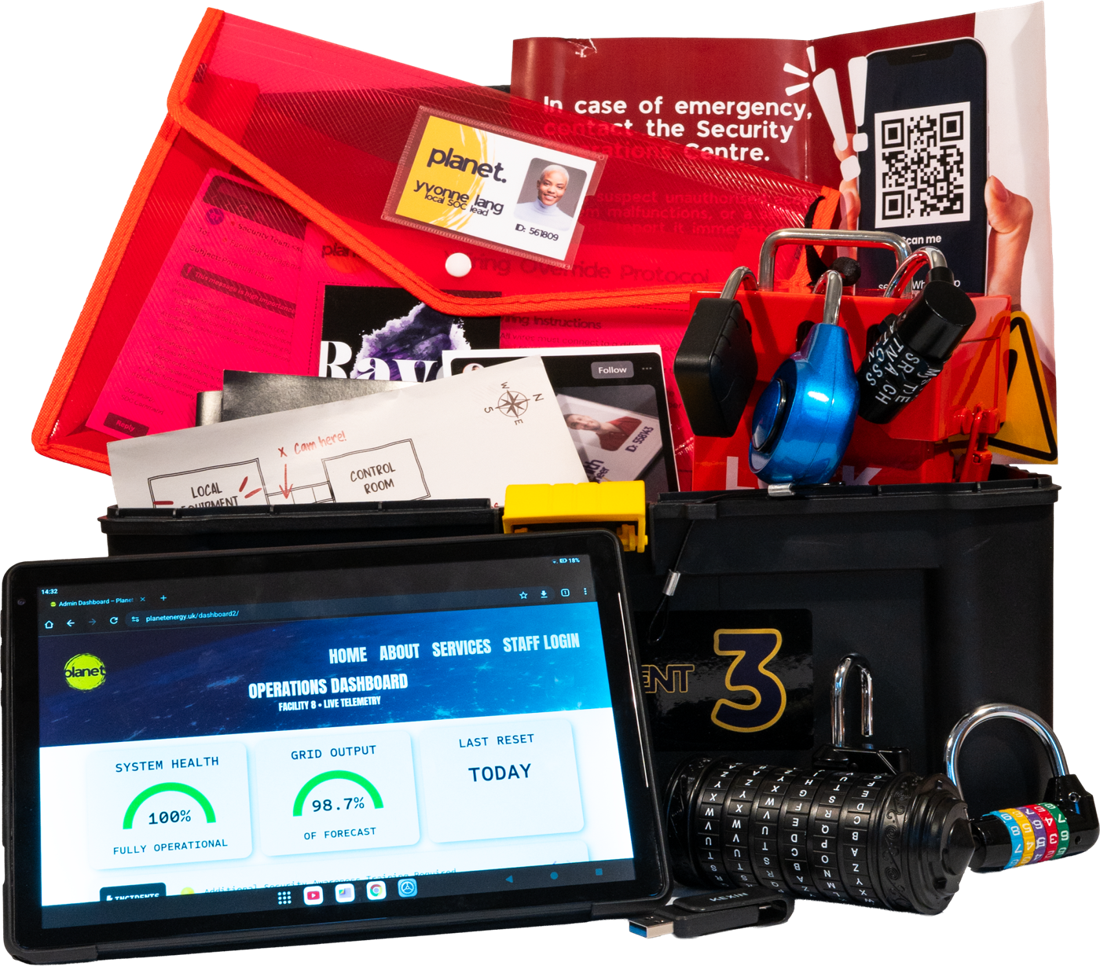
The kit goes where your people are.
ESC isn’t tied to one training room. A physical kit can go to regional offices and satellite sites, giving local teams an in-person experience without dragging everyone back to head office.
Several kits, several sites
Running the same campaign across more than one office? Use multiple kits. Different sites can work through the same scenario on the same day or across a longer campaign. Your teams get a shared experience without everybody needing to be in the same building.
Train-the-trainer: your teams run the show
Your internal champions can learn how to host the experience locally. Once they’re trained, teams don’t have to wait for a central facilitator to travel between every site. Local hosts run the scenario, reset the kit and keep sessions moving around their own working patterns. If you’re building that network, here’s how to build a security champions programme around it.
The Breach: one scenario, different formats.
A ransomware attack. Five suspects. One way in. The Breach gives head office and regional teams a shared ransomware story through SPACE_ and ESC. For remote employees, SHIFT provides browser-based missions that target the same security behaviours.
The flagship, at head office
SPACE_ takes the story into a large-scale immersive environment for flagship events. A live SOC room. Real dashboards. A breach unfolding around the team. For the big moment when you want people to step inside the incident rather than hear somebody describe it.
Explore SPACE_The same story, on every site
The Breach physical escape room gives local teams the investigation in a portable kit. Emails. Logs. Phone records. Social profiles. Five suspects who all look guilty enough to waste your time. Teams work out what happened before the clock runs out, then unpack the decisions afterwards.
Explore The BreachThe same behaviours, in a browser
For employees who can’t get around a physical kit, SHIFT gives them browser-based cyber missions they can complete independently. No room booking. No travel. No scheduled group session. Choose from the current mission library according to the behaviours you want people to practice.
Explore SHIFTRemote teams in the story before it starts.
If the main event is happening at head office, remote people shouldn’t find out about it from the photos afterwards. Pre-engagement can start the story across the organisation before anybody walks into the room.
It doesn’t have to be one building either. SWIFT ran events with us at its sites around the world through October, so teams in different countries took part in the same campaign instead of hearing about it second-hand.
Done well, by the time the live event arrives, people away from HQ have already done something, found something and contributed something. Not watched from the sidelines.
OSINT challenges
Short digital investigations give remote employees a clue to chase from wherever they’re working: publicly available information to dig into, something that doesn’t add up, a detail another team needs.
Broadcast messages
In-character emails and messages move the story forwards between activities. They also give people something familiar to question. Who is this actually from? Why are they asking? Does the language feel right?
Distributed team missions
Give different sites different information. Suddenly nobody can finish by disappearing into their own little silo. Teams have to talk across locations, compare what they know and work out what everybody else is missing.
AI-powered contact
Calls, video calls and messages from in-character personas bring another kind of pressure into the story. A persuasive voice is harder to deal with than a red flag on a slide.
Our teams were fully engaged, with participants describing the sessions as ‘actually fun’ (something you rarely hear about cybersecurity training).
Sally Bolton · Cyber Human Risk Manager, ScottishPower Energy Networks
How to run cyber training across remote and hybrid teams.
You don’t start with the product. Start with the workforce. Where are people? How do they work? Which behaviours are you trying to rehearse? Then build the programme around the answers.
Plan your cyber security training programme
Map the people first. Headcount. Locations. Working patterns. Regional offices, home workers, shift teams and the groups who are hard to get into one room at one time. Then decide what you need them to practice.
Choose the right training for each team
SHIFT can cover people working remotely and on their own schedule. CTRL+Vish can rehearse phone-based social engineering across the workforce. ESC gives local office teams something physical to work through together.
Keep your teams engaged beyond one session
Pre-engagement pulls people into a story before the main event. Facilitated ESC sessions finish with a debrief. SHIFT missions can run across a longer campaign instead of one annual event. Repetition is how knowledge turns into something people use.
Review participation and training outcomes
SHIFT scores decisions made in its missions. CTRL+Vish reports on behaviour during simulated calls, with recordings and benchmarking. ESC debriefs explore what teams noticed, questioned or missed. Use it to see where people need more practice, not to build another dashboard nobody opens.
Questions remote and hybrid teams usually ask.
Can training work for fully remote employees?
Yes. SHIFT is browser-based and built for solo participation, while CTRL+Vish runs through phone-based simulations. Remote employees don’t need to travel to a central training location for either format.
Can different offices take part in the same programme?
Yes. ESC kits can be used across different sites, and local hosts can run sessions after train-the-trainer. Digital and phone-based experiences can sit alongside those physical sessions in the wider programme.
Do remote employees need to install software?
No. SHIFT doesn’t need a download or software installation. Participants open a link and enter the mission through their browser.
How long does a remote cyber security training session take?
It depends on the format. Current SHIFT missions run for up to 45 minutes, with individual missions varying. CTRL+Vish is structured as a wider programme rather than one fixed session.
Can we combine digital, phone and physical experiences?
Yes. That’s the point of building around the workforce rather than forcing everybody into one format. SHIFT can cover remote individuals, CTRL+Vish can run phone-based rehearsal across locations and ESC can give office-based groups an in-person experience.
Every location.
Tell us your headcount, where your teams work, how their working patterns differ and what you need people to practice. We’ll map out which formats make sense across the organisation, so the good stuff doesn’t stop at head office.